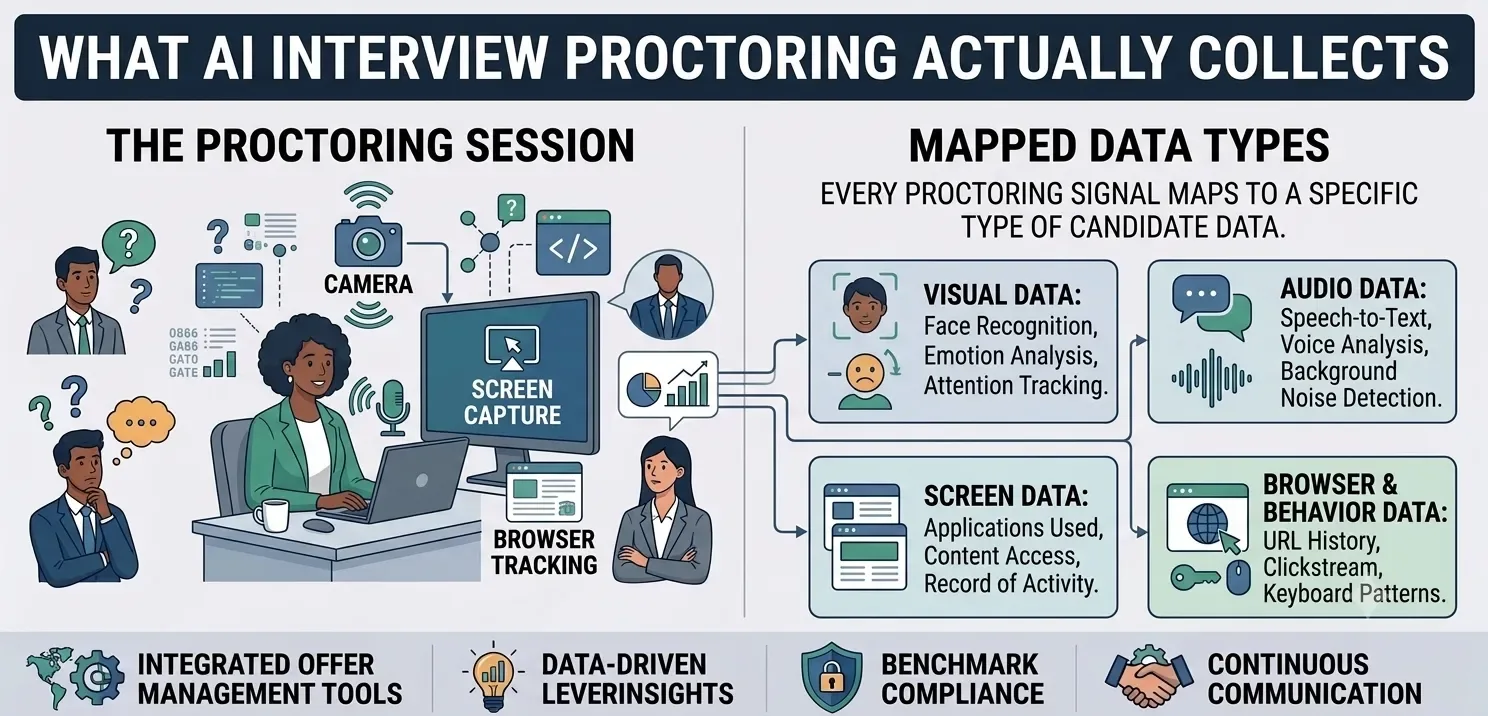
Most teams evaluate AI interview proctoring on one question: does it catch cheating? That’s a fair question, but it skips a second one that compliance and legal stakeholders ask the moment proctoring reaches their desk. What exactly is this tool capturing about a real person, and where does that data go afterward? Proctoring software watches a candidate’s face, listens to their voice, and records their screen. That’s not a minor detail. It’s the actual product.
What AI Interview Proctoring Actually Collects
Strip away the marketing language, and most AI interview proctoring tools are collecting a consistent set of signals. Eye movement tracking watches where a candidate looks during the session. Tab-switch detection logs every time they leave the assessment window, down to the timestamp. Multi-face detection flags when more than one person appears on camera. Full-screen mode monitoring catches jumps between applications or the desktop. Audio analysis listens for unusual sounds or a second voice in the room. Screen recording captures the entire session, and the system takes timestamped screenshots on top of that. Identity verification confirms who’s actually sitting for the interview before it begins.
That’s the methodology InCruiter’s IncProctor documents on its own product page, and it’s a fairly representative list across the category. None of it is unusual for proctoring software. What’s worth sitting with is the sheer range of it: face, voice, screen, and behavior, all captured on one real person who is trying to get a job.
Why This Is a Privacy Question, Not Just a Security One
Security and privacy get treated as the same conversation in a lot of vendor pitches, and they aren’t. Security protects the data once it exists. Privacy asks a different question: should you have collected it in that form at all, who gets to see it, and how long does it stick around. A tool can be extremely secure and still raise real privacy questions if candidates don’t know what the tool is capturing, or why.
Face and voice data sit in a more sensitive category than a typical form field. Someone can use that data to identify a specific person, even outside the original context where you collected it. That’s a well-established data-protection principle, not a fringe concern. It’s part of why HR and legal teams increasingly ask about proctoring separately from the rest of an ATS stack. One honest caveat: this isn’t legal advice. What’s actually required of you depends on your jurisdiction, the roles you’re hiring for, and how your organization already handles biometric-adjacent data elsewhere. If that’s a live question for your team, it belongs with counsel.
What consent should actually mean here
A toggle a candidate has to switch on before entering full-screen mode is a consent mechanism, but it’s a thin one. It confirms the candidate took an action. It doesn’t confirm they understood what the system is recording, why, or how long it keeps that data. Meaningful consent here means telling candidates, in plain language, before the session starts: the system will record video, audio, and screen activity, here’s what it’s checking for, and here’s who reviews the results. That’s a low-cost addition to any proctoring workflow. It’s the difference between a candidate who feels informed and one who feels surveilled.
What to Ask a Proctoring Vendor Before You Deploy It
Most proctoring evaluations start and end with detection accuracy. A more complete evaluation covers the data side too:
What exactly does it record, and how long does it keep that data?
Get a specific retention period, not a vague “as needed” answer.
Who can access a candidate’s session recording, and under what circumstances?
A hiring manager and a data-protection officer have very different reasons to look at the same recording.
What happens to the data if a candidate isn’t hired?
Deletion timelines vary widely across vendors. Pin this down before you sign, not after a candidate asks.
Do you tell candidates what you’re capturing before the session starts, or only that they’re “being proctored”?
Those are different levels of disclosure.
Certifications worth understanding, not just collecting as logos
Security certifications are a useful signal, but only if you know what they actually cover. SOC 2 speaks to how a vendor’s internal controls protect data operationally. ISO 27001 is a broader information-security management standard. A stated GDPR-compliance claim speaks to the vendor’s general posture toward EU data-protection law. It isn’t a guarantee that your specific deployment is compliant that still depends on how you configure and use the tool. InCruiter’s IncProctor states all three on its product page. Treat that as a starting point for a conversation with any vendor, not a substitute for asking the retention and access questions above directly.
Keeping Candidate Trust Without Slowing Down Hiring
None of this requires slowing hiring down. A short, plain-language notice before the session starts. A clear answer on retention. A defined access list. Together, these cost almost nothing to put in place, and they address most of what makes candidates uneasy about being recorded. Teams that skip this step usually don’t hear about it until a candidate raises it publicly, or a legal team asks after the fact. Building it in from the start is cheaper than fixing it later.
A candidate sitting for a proctored interview has a camera and a microphone pointed at them for the entire session. Treating that as a routine security feature, rather than something worth a plain-language heads-up, is usually where trust breaks down not in the technology itself.
Frequently asked questions
What data does AI interview proctoring actually collect?
Typically face and eye movement data, audio, screen activity, timestamped screenshots, and identity-verification data. The exact list varies by vendor, so it’s worth confirming directly rather than assuming.
Is it legal to record and monitor candidates during an interview?
This depends on your jurisdiction and how you handle the recording, and it isn’t something a blog post can answer for your specific situation. What’s consistent across regions: clear, upfront disclosure to the candidate is good practice, regardless of the exact legal requirement where you operate.
Do candidates have to consent to being proctored?
Most proctoring tools require some form of acknowledgment before a session starts, often a toggle to enable full-screen mode. Whether that counts as adequate consent depends on how much you actually tell the candidate beforehand. The plainer and more specific the disclosure, the stronger the consent.
What should I ask a proctoring vendor about data handling?
InCruiter’s guide to comparing proctoring software covers the feature side of vendor comparison. On the data side specifically, ask for a stated retention period, a defined access list, and a plain-language answer on what happens to recordings for candidates who aren’t hired.
How is this different from how proctoring tools detect cheating?
That’s a related but separate question. InCruiter’s guide to how companies detect AI-assisted interview cheating covers the detection side. This piece covers what happens to the data those detection methods generate.
Ready to Transform Your Hiring Process?
Discover how our AI-powered interview platform can streamline your recruitment and find the best candidates faster.
Make Your Hiring Process Smart and Fast